2D game enginePublic release coming soon
You and an AI, building one game together.
Argus is a 2D game engine made so an AI agent can work on a game as well as you can, right beside you. The game runs live, and you, the agent, the tests and the command line all work on that one running game.
01The idea
Most game engines seat one person at an editor. Argus seats two.
You
At the editor, with the live game in front of you.
The agent
In Claude, Cursor or Codex, on the same running game.
The game runs live in a background program that holds its whole world. Everyone works on that world through one protocol, so the agent works from the game itself. It can look at the game, play it, rewind it, test it and change it, then tell you what happened and why.
02Live in this page
This is Hollow, running here. The boxes are what the agent sees.
Hollow is one of the example games, and this is its real web build. Click it and play. Each box comes from the frame the agent gets from observe, read from the game as it runs. Switch the view to see the game, the agent's picture of it, or both at once.

The live game didn't start in this browser, so this is a clip of it instead. You can play Hollow from the games page.
- ←→ or AD move
- Space or Z jump
- E talk
- R restart
On a phone, use the buttons the game draws on the picture. Scroll from the space around it.
Replay starts Hollow again from the same seed and plays back every key you pressed, tick for tick. The digest is a hash of the whole world, so the same digest at the same tick means the same game.
This is what the agent works from. It reads the running game itself, so it does not have to guess what the game does from its source code.
03See and play
An agent that can see the game and play it.
The agent reaches the running game through the same protocol as the editor. These calls are how it looks, moves through time and asks what happened.
-
observe
The frame as data: what is on screen, where it is and what it is, in about 3 KB. Or the frame as a picture.
-
run, seek
Move time forward, or back to any frame.
-
query
Read any entity in the world.
-
events
What happened, and what caused it.
04Every change is a step
Every change is a step you can see and undo.
Edits are transactions. Each one carries a note and an author, you or the agent, and they all land in one change feed. You can see who changed what and why, and undo any step.
When the agent has an idea, propose offers the change for you to try before it is kept.
- Editby you
- Editby the agent
- Proposalby the agent, for you to try
- Keptby you, after trying it
05Same seed, same game
The same seed plays the same game, bit for bit.
A run comes out the same on Windows, Linux, the Mac and in the browser. A failing test saves a replay that opens at the moment it failed. When a player flags a moment while playing, with a mark and a note, the agent opens the game at exactly that frame.
Hollow, in the panel above, right now: tick , digest . Press Replay there to see it reached again.
- A player's mark, with a note
- Where a test failed
Each one opens the game at that exact frame.
06Tests that play
Tests that play the game.
A scenario drives the game with scripted input and checks what must stay true, over one seed or a hundred. A change is done when the scenarios pass.
- FirstScripted input
- ThenThe game plays
- AlwaysChecks that must hold
One scenario, a hundred seeds.
07Tuning and speed
Tuning and speed are data too.
Mark a field as tunable and sweep it across seeds. profile reports each system's cost against the game's performance targets, and names the system to look at.
Systems run in parallel
Four heavy systems, one tick. Systems that do not touch the same components run side by side, and the world comes out identical on 1, 3 or 4 threads.
| Measured | Target | Result |
|---|---|---|
| Swarm, with the swarm on the hero: sim tick | under 6 ms | 1.7 msmet |
| Outpost at 10x speed, 200 colonists and 20,000 items: sim tick | under 1.6 ms | 1.2 msmet |
| Outpost fast-forward, headless | over 2,000 ticks/s | about 3,500metA month of colony life in about 30 s. |
| Collision pass, 100,000 entities moving | none set | 0.43 ms |
| Save and load at eight hours of play | under 200 and 500 ms | 66 and 280 msmet |
| A web build's first load on a 20 Mbit link | under 5 s | 2.6 smet |
08The whole engine
A whole 2D engine, under one roof.
- Luau scripts that reload while the game runs
- Scenes as plain text, one file per entity
- Sprites, Aseprite and Spine animation
- 2D lighting with shadows and normal maps
- Particles
- Parallax
- UI with rich text and a screen-reader feed
- Touch controls
- Sound and adaptive music
- Physics
- Tilemaps
- Dialogue and timelines
- Saves
- Mods
- Turn-based games that keep animating between turns
- Rust plugins for the hot paths
09The example games
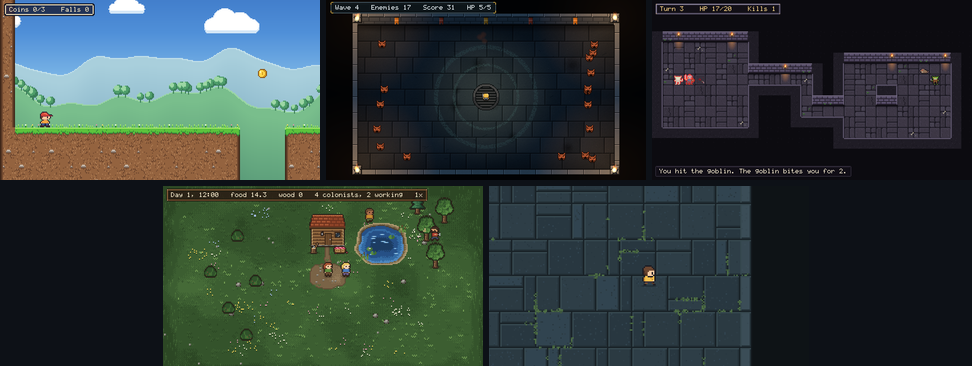
Four example games, each with a feature an agent added.
Each agent was given only the game and Argus's docs.
-
Hollow
Plays in your browserA platformer with 2D lighting, dialogue, music, and rooms that stream in.
The agent added a feather for a double jump.
-

Delve
Plays in your browserA turn-based dungeon on a tilemap, with menus and potions.
The agent added healing potions.
-

Swarm
An arena shooter with hundreds of enemies. Its chase runs in a Rust plugin.
The agent added charging “dasher” enemies.
-

Outpost
Plays in your browserA colony where colonists find work, farm, cut wood and eat.
The agent added woodcutting.


10Out to players
It ships games.
argus build makes a release with the game's own name and icon. It checks that the release plays and looks exactly as the project does, and it needs no compiler. Steam support is built in.
- Windows
- Linux
- macOS
- The web plays on a phone, by touch
It is made for people too.
The editor shows the live game with a hierarchy, an inspector, a timeline, tilemap painting and a replay scrubber. A review page works on a phone.
11Get started
Start from a game that already plays.
Once the public release is out, a new game starts from a template: a small game that already plays, with its art drawn by a script you or an agent can change, and scenarios that pin how it plays.
argus new my-game --template platformeror blank, roguelike, arena, colonycd my-gameinto the new projectargus testthe template's scenarios passargus editorthe game in the editorargus mcp setup claude-codeor claude-desktop, cursor, vscode, codex, gemini
12Where it stands
Plainly, where Argus is today.
- YoungArgus is at version 0.1.2, tested in private. The public release is coming soon.
- 2D onlyThere is no 3D.
- Phones play in the browserPhones and tablets play Argus games in the browser, not as installed apps.
- In testingOnline multiplayer, with rollback, through a relay, for the next release.
The next step
The public release of Argus is coming soon.